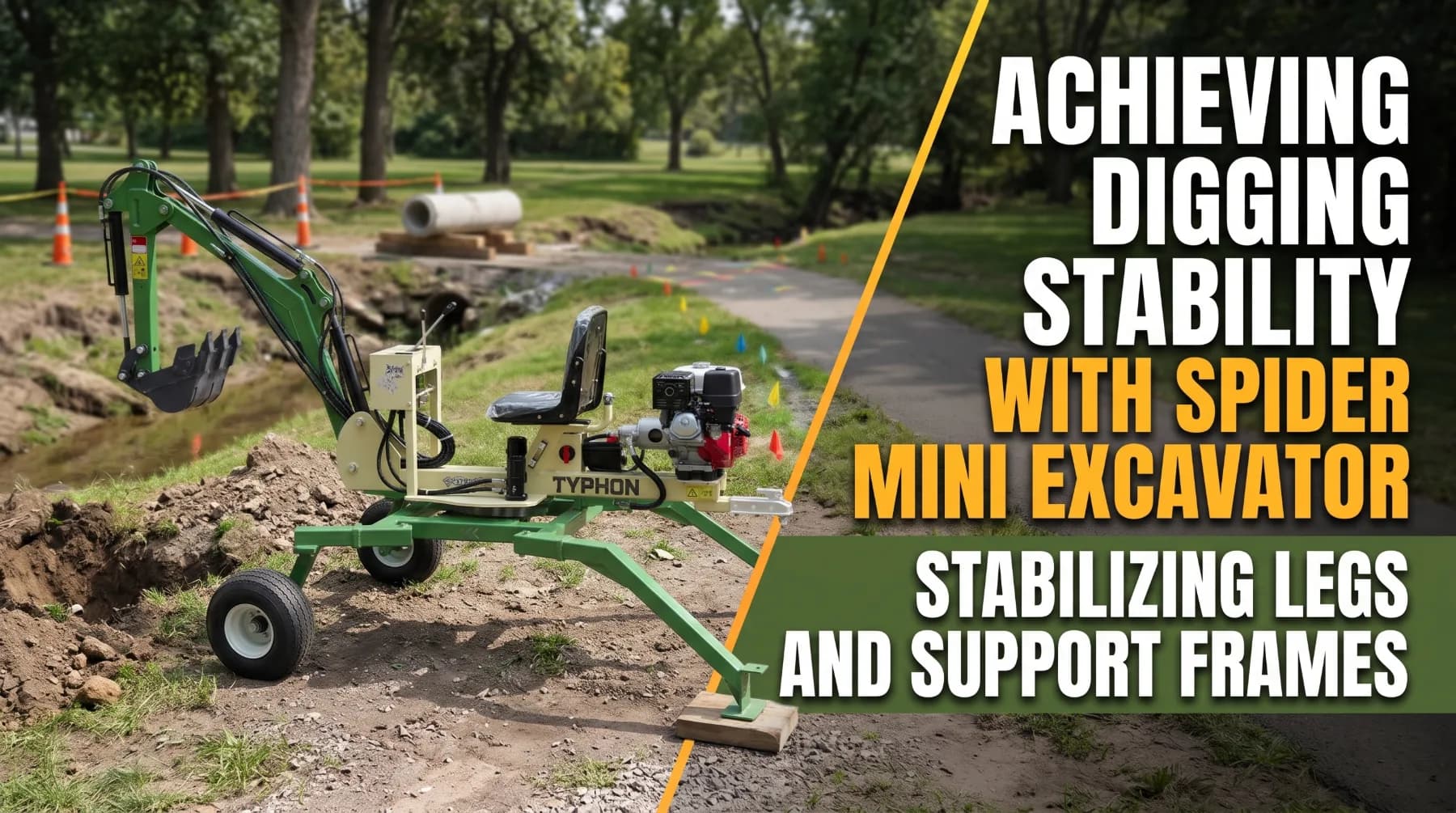
A municipal parks crew is replacing a collapsed drainage culvert where a walking path crosses a small creek. The banks on both sides are steep, the path is too narrow for a conventional excavator, and mature trees crowd the work area. The crew brings in a SPIDER mini excavator with stabilizing legs and walks it carefully to the edge of the path. The operator deploys the legs and starts removing the broken culvert sections.
Everything seems steady until he reaches toward the creek with a loaded bucket of wet silt. One of the downhill legs rests on a patch of bank that has been soaking up water for days. As the bucket swings outward, that pad slowly presses into the saturated soil and the machine leans toward the water. The operator stops, lowers the bucket to the ground, and the frame settles back.
The crew foreman calls a pause. They dig out the soft material beneath the downhill leg, place an approved support pad on firm subsoil, and reposition the machine so the bucket works within the area framed by its supports instead of reaching past one leg. The operator also shortens his reach and pulls each bucket closer before lifting. The new culvert is set by mid-afternoon with no further movement. The machine and its legs never failed. The ground under one pad and the direction of the reach made the difference.
SPIDER mini excavators are designed for compact excavation in places where access is tight and ground conditions change from one setup to the next. On models built with them, stabilizing legs and support frames add points of ground contact and help create a firm, controlled working position. That support matters most when digging on slopes, beside structures, along banks, or on uneven residential and landscaping sites. Its effectiveness depends on how well operators understand the support system, how carefully the ground is prepared, and how the machine is positioned relative to the work.
Stabilizing Leg Structure and Contact Points
Stabilizing legs reach outward from the machine to create additional contact points with the ground. Depending on the design, they may be positioned by hydraulic cylinders, set manually and secured with locking pins, or use a combination of both. Each leg ends in a contact pad or foot that spreads load across the surface beneath it. Some pads pivot to sit flat on uneven ground, while others use fixed designs suited to firmer surfaces.
Together, the legs widen the machine's support base. A wider base gives digging and swinging forces more paths into the ground and helps keep the machine's center of gravity safely inside the area it rests on. The result is a steadier platform for precise digging, especially when the bucket works close to the limit of its reach.
That benefit only holds when every leg carries its share. A leg that barely touches the ground provides little support, which forces the remaining legs to carry more load than intended. On hydraulically positioned legs, load-holding valves are designed to keep each leg in place under pressure. A leg that creeps, drops, or retracts during work signals a problem, and the machine shouldn't continue operating until a qualified technician has assessed it.
Deploy the legs exactly as the operator's manual describes. Follow the recommended sequence, confirm that each pad sits fully and evenly on the ground, and check that any manual locking pins are installed with their retainers in place. Avoid raising the machine higher on its legs than the manufacturer allows, since extra height can raise the center of gravity and reduce stability rather than improve it. Before every shift, look for cracked or bent legs, damaged pads, missing retainers, and uneven pad wear, which can indicate that a leg isn't seating correctly.
Key takeaway: Stabilizing legs widen the support base and spread digging forces into the ground, so deploy them in the manufacturer's sequence, confirm firm contact at every pad, and report any leg that creeps or shows damage.
Support Frame Alignment During Digging
The support frame connects the boom, the machine body, and the stabilizing legs into one load-carrying structure. When the bucket bites into soil, force travels up through the arm and boom, into the frame, and down through the legs to the ground. Correct alignment spreads that force evenly across all supports. Poor alignment concentrates it on fewer points, which can cause the frame to flex, a pad to sink, or the machine to shift unexpectedly.
Good alignment begins during setup. Each leg should be positioned within its approved range and secured as the manual directs. The frame should sit square to the work area, and no frame member should rest on a rock, root, curb, or chunk of debris. A single hard object beneath the frame can act as a pivot point and change how the machine reacts under load.
Levelness supports alignment. Many machines include a level indicator that helps operators confirm frame position before digging begins. Working within the manufacturer's level limits keeps the center of gravity where the design expects it to be. A machine that sits noticeably out of level starts each digging cycle with less stability margin, and digging forces tend to push it further toward the low side.
Alignment can drift as the shift goes on. Repeated digging cycles, vibration, and gradual soil settlement can move the legs slightly, especially on softer ground. Watch for changes in the machine's attitude, listen for unusual creaking from the frame, and recheck pad contact at regular intervals. When the setup no longer matches what you started with, lower the bucket to the ground and reset the supports before continuing.
Key takeaway: The support frame carries digging forces from the boom into the legs, so set the machine square and level, keep debris out from under frame members, and reset the supports whenever the machine's attitude changes.
Ground Preparation Beneath the Supports
No stabilizing leg can be stronger than the ground beneath it. A pad resting on loose fill, saturated soil, soft clay, landscape mulch, or a hidden void can sink under load regardless of how solid the leg itself is. Recently backfilled trenches, old excavations, decayed roots, and creek banks after rain all create weak spots that can look firm on the surface.
Preparation starts before the machine is set up. Contact the local utility locating service and wait for all lines to be marked before any digging begins. Ask property owners or site managers about private lines, irrigation systems, septic components, and old structures that may not appear on public utility records. Walk the planned setup area, probe suspicious ground, and remove loose surface material until each pad can rest on firm soil.
Approved support methods can help on marginal ground. Where the manufacturer permits them, purpose-made support pads or properly rated cribbing spread each leg's load across a larger area. Use only materials strong enough for the load and large enough to support the entire pad. Never stack loose bricks, blocks, or improvised supports beneath a leg, since they can shift, crack, or crush without warning.
Excavation edges call for extra caution. The combined weight of the machine and the force through each leg can collapse the side of a trench, footing, or bank. Keep legs well back from the edge, increase that distance as the excavation deepens, and avoid setting up on ground already cracked by previous digging. Watch the pads throughout the work. Sinking, soil cracking around a pad, or water seeping up beneath a support should trigger an immediate stop and reassessment. Where workers must enter an excavation, follow applicable excavation safety rules for protective systems and inspection.
Key takeaway: Stabilizers depend entirely on the ground beneath them, so locate utilities, remove soft surface material, use only approved support pads, keep legs back from excavation edges, and stop at the first sign of sinking.
Bucket Force and Machine Reaction
Every digging cycle produces forces that act on the whole machine. When the bucket curls into the soil, breakout force pulls the machine toward the excavation. When the arm crowds material inward, the reaction pushes back through the frame. If the bucket strikes rock, a root, or buried debris, the machine absorbs that sudden resistance through the boom, frame, and supports. A well-positioned machine handles these forces calmly. A poorly supported one may rock, shift, or lift a leg.
Leverage magnifies these effects. A loaded bucket held far from the machine creates more tipping force than the same load held close. Raising a full bucket high at long reach moves the center of gravity outward and upward. Material density adds to the effect, since wet silt, clay, rock, and broken concrete weigh far more than dry topsoil for the same bucket volume.
Controlled technique keeps those forces under control. Use smooth, progressive joystick movements and take passes suited to the soil rather than forcing deep cuts. Curl and draw each load toward the machine before lifting it. Never use the bucket to push, lift, or drag the machine while the legs are deployed unless the manual describes that procedure for the exact model. When the bucket stalls against an obstruction, release the controls rather than holding them at relief, then dig around the obstruction or change the approach.
Operators often feel a stability change before they see one. A machine that feels light on one side, a pad that lifts slightly, or a frame that rocks under load all signal a shrinking stability margin. Stop, lower the bucket to the ground, and reposition before continuing. Wear the seat belt or operator restraint whenever the machine is in use, since the protective structure can only protect an operator who stays inside it.
Key takeaway: Digging forces and loaded-bucket leverage act on the entire machine, so keep loads close and low, use smooth passes, release the controls when the bucket stalls, and stop whenever the machine feels light on one side.
Support Position and Excavation Direction
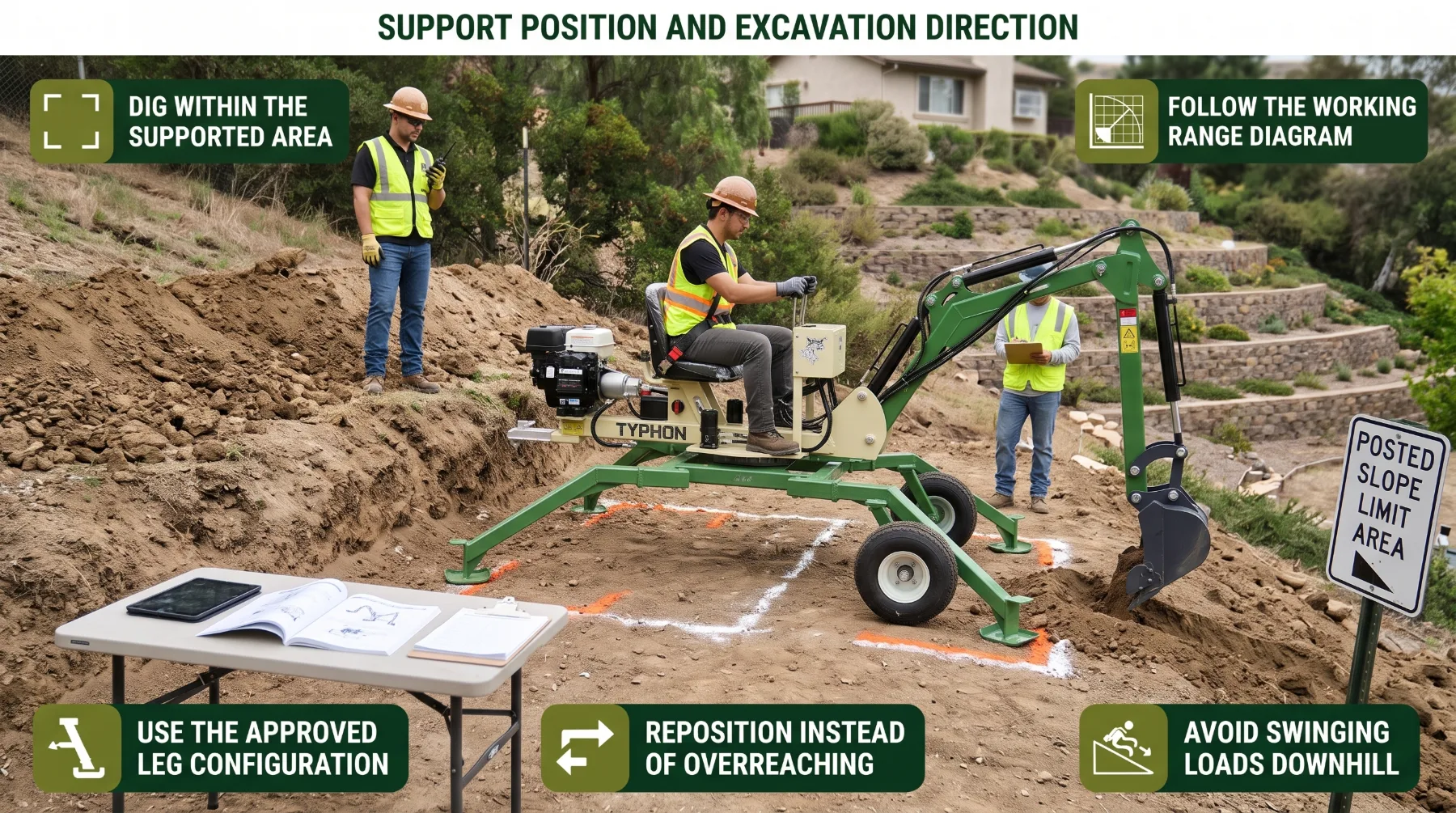
The direction in which the bucket works determines how forces reach the supports. A machine with stabilizing legs is generally steadiest when the bucket digs within the area bounded by its supports, where the base is widest and the legs share the load. Digging toward a narrow side or swinging a loaded bucket beyond the supported area places more force on fewer legs and reduces the stability margin, as the parks crew discovered at the creek.
Each manufacturer defines the approved operating arrangement for its machines. The working range diagram, operator's manual, and any load or stability charts describe where the bucket can work safely and which leg positions apply to different tasks. Some machines allow several leg configurations for different jobs, while others require specific settings when digging near the edge of the working range. Follow the instructions for the exact model rather than relying on habits formed on other equipment.
Planning the setup saves time and reduces risk. Before deploying the legs, decide where the excavation will run and position the machine so the bucket can reach the work without excessive extension or swinging toward an unsupported side. When the work moves beyond comfortable range, retract the bucket, raise the legs according to the manual, and reposition. A few minutes spent repositioning is always faster than recovering from a shifted machine.
Slopes add complexity. On sloped ground, the downhill legs carry more of the load, and digging or swinging toward the downhill side combines several risks at once. Follow the manufacturer's slope limits, create a level working area where possible, and avoid swinging loaded buckets downhill. Keep pedestrians and crew members outside the full swing radius and away from the supports. When conditions exceed the approved arrangement, change the setup or the method.
Key takeaway: Dig within the area bounded by the supports, follow the manufacturer's approved working range and leg configuration, and reposition the machine rather than reaching or swinging a loaded bucket toward an unsupported side.
Inspection of Legs, Pins, and Frame Components
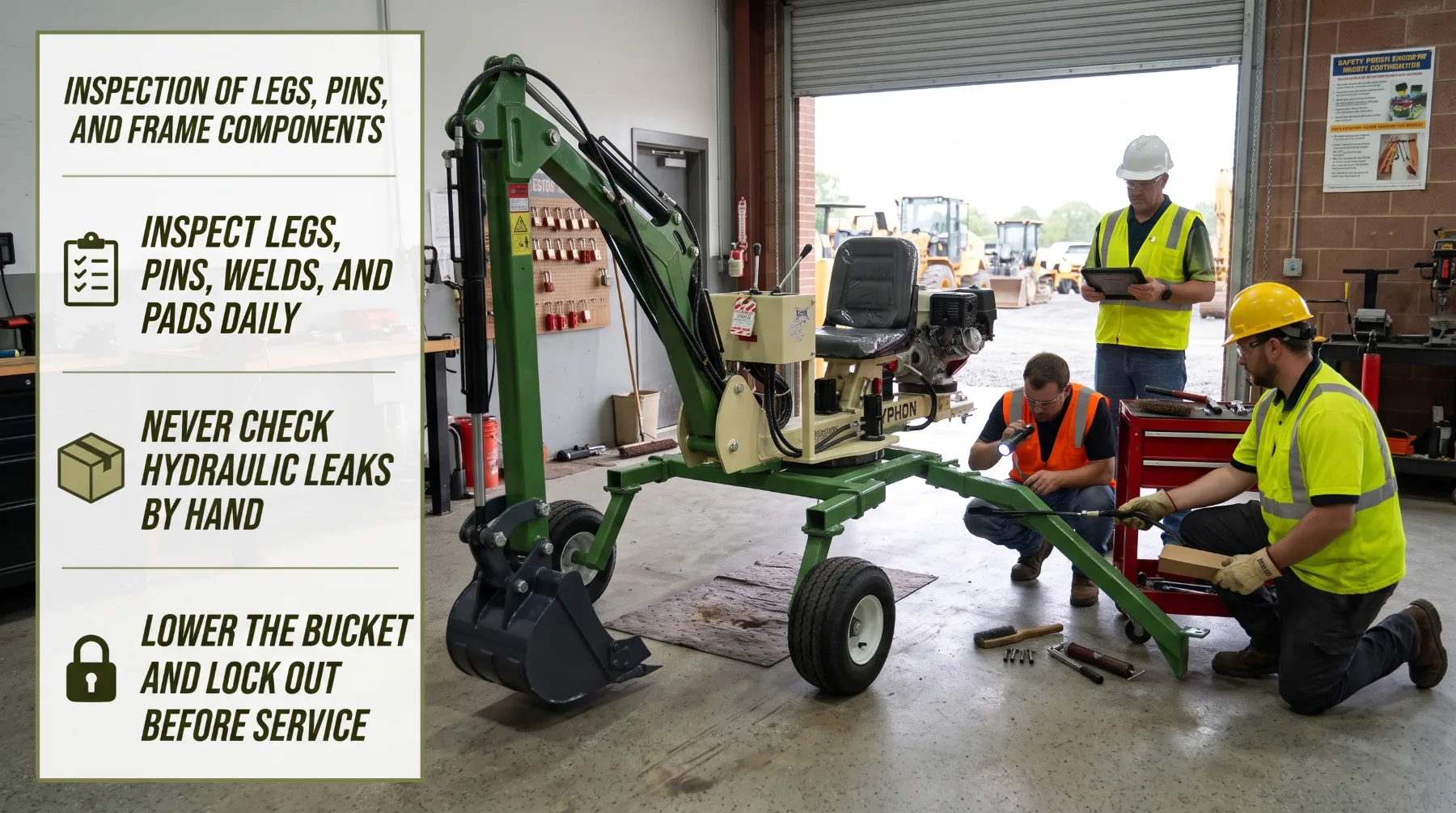
Routine inspection keeps the support system reliable. Before each shift, examine the stabilizing legs, pads, pivot points, retaining pins and retainers, welds, and frame mounting areas. Look for bending, cracks, elongated pin holes, loose fasteners, worn bushings, and unusual movement at joints. On hydraulically positioned legs, inspect cylinders, rod surfaces, hoses, and fittings. Grease pivot points at the intervals the manufacturer specifies, and more often in muddy, dusty, or wet conditions.
Clean components make problems easier to spot. Packed mud and soil can hide cracked welds, loose hardware, and damaged pins. Wash or brush the legs and frame regularly so inspections are thorough. Any cracking, bending, or abnormal movement requires attention before further operation, and the machine should stay out of service until a qualified technician has assessed it.
Hydraulic leak checks must be done safely. Never use your hand to search for a hydraulic leak around leg cylinders, boom cylinders, or hoses. Fluid escaping through a pinhole under pressure can penetrate skin and cause an injection injury. The wound may look like a minor puncture at first, but it's a medical emergency that requires immediate surgical treatment. Hold a piece of cardboard or wood near the suspected leak point, wear gloves and eye protection, and keep your face and body out of line with the fitting. If anyone is struck by escaping fluid, get emergency medical care at once and tell medical staff it's a hydraulic injection injury.
Key takeaway: Inspect and grease legs, pins, welds, pads, and cylinders every shift, keep components clean, check leaks with cardboard rather than your hands, and complete a full lockout before any service.
Conclusion
Stabilizing legs and support frames give a SPIDER mini excavator a firmer, more controlled working position when they're used as the machine's design intends, helping reduce unnecessary structural stress and supporting long-term machine durability. The legs widen the support base, the frame carries digging forces into the ground, and correct alignment allows those forces to spread evenly. Their real-world performance still depends on the condition of every structural component, the strength of the ground beneath each pad, the direction of digging, the operator's control of the bucket, and proper maintenance throughout the machine's service life.
Contractors and operators who treat the support system as part of a complete setup achieve the most dependable results and help preserve the excavator's long-term reliability. Locate utilities, prepare firm ground under every pad, keep legs back from excavation edges, and follow the manufacturer's approved working range and leg configuration. Dig with smooth, controlled passes, keep loads close, and reposition rather than overreach. Back those habits with daily inspection, cardboard leak checks, and full lockout before service. Stabilizers never replace careful site assessment or manufacturer limits, but used correctly, they support accurate, confident digging, reduce avoidable wear, and contribute to longer service life and lower ownership costs on demanding sites.
Frequently Asked Questions
What is the purpose of stabilizing legs on a mini excavator?
Stabilizing legs add ground contact and widen the machine's support base during operations for which the machine is designed to use them. They help spread digging forces into the ground and create a steadier working position for controlled, accurate excavation.
Do stabilizing legs make every surface safe for excavation?
No. Soft, saturated, sloped, or unstable ground can still create serious risks with the legs deployed. Loose fill, buried voids, and excavation edges can give way beneath a pad. Operators must assess and prepare the ground and stay within the manufacturer's limits.
Why should support frames be inspected regularly?
Damage to frames, pins, welds, and mounting points reduces structural reliability and can affect stability without obvious warning. Regular inspection catches cracks, bending, worn pin holes, and loose hardware before they lead to failure.
Can operators dig in any direction when stabilizers are deployed?
No. Operators must follow the manufacturer's approved operating arrangement and working range for the exact model. Digging toward a narrow side or swinging a loaded bucket beyond the supported area reduces stability, so reposition the machine when the work moves outside the approved range.